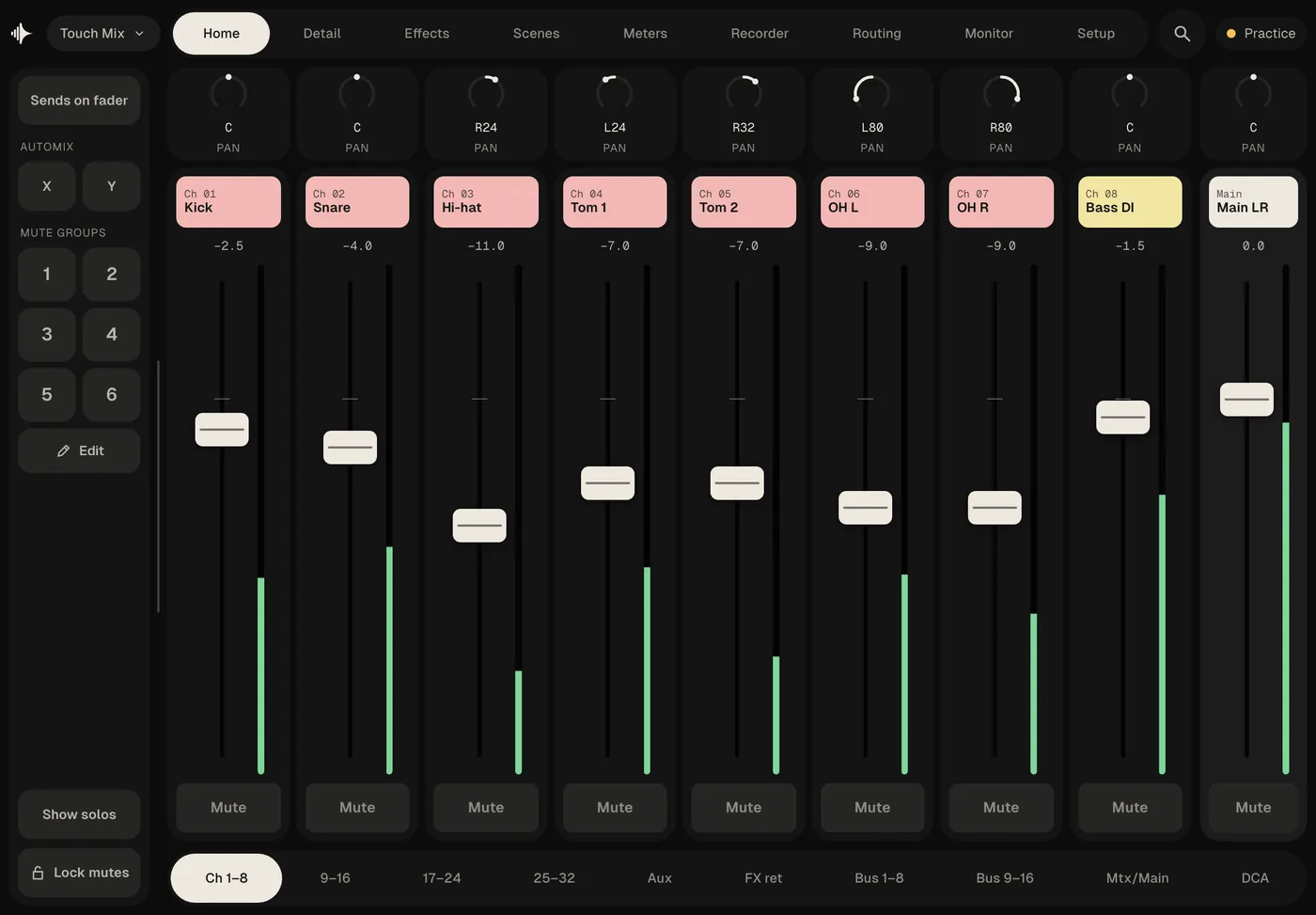
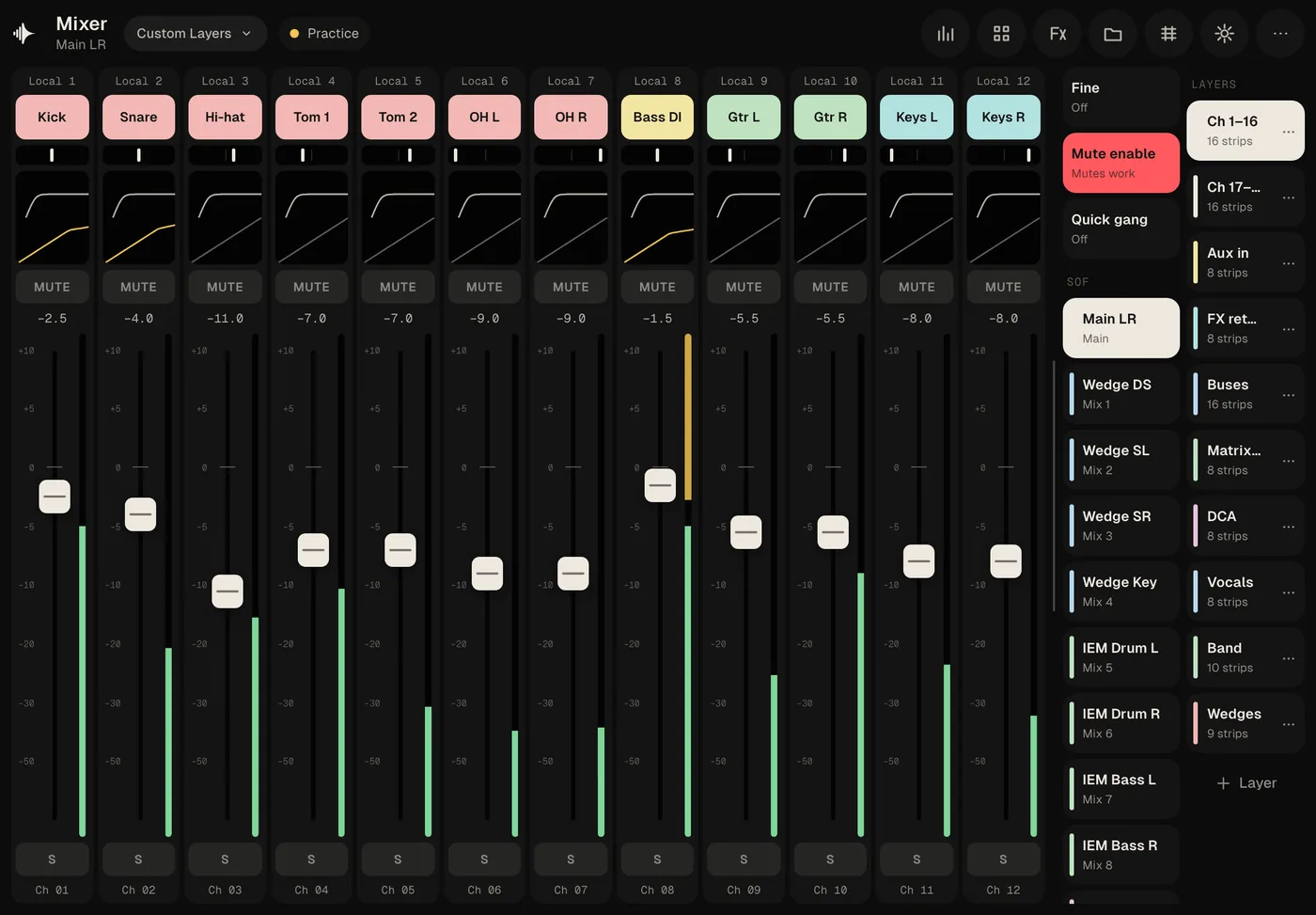
A remote for Behringer X32 and Midas M32 desks on laptops, tablets and phones. Five layouts, so you mix the way you already know — and every musician mixes their own monitors from their phone.

Mode Console Edit Practice03 Sunday Morning
Ch 13Lead VoxHomeConfigGateDynEQInsertSendsMain
1234LC
SoloPFL · before faderAFL · after faderExclusiveSolo follows selectDim on PFLMonitor & phonesMonitorPhonesSrc trim
Ch 01Kick
MUTES
Ch 02Snare
MUTES
Ch 03Hi-hat
MUTES
Ch 04Tom 1
MUTES
Ch 05Tom 2
MUTES
Ch 06OH L
MUTES
Ch 07OH R
MUTES
Ch 08Bass DI
MUTES
Ch 09Gtr L
MUTES
Ch 10Gtr R
MUTES
Ch 11Keys L
MUTES
Ch 12Keys R
MUTES
Ch 13Lead Vox
MUTES
Ch 14BV 1
MUTES
Ch 15BV 2
MUTES
Ch 16Host
MUTES
MainMain LR
MUTES
Ch 1–16Ch 17–32Aux/FXBus 1–16MatrixDCAUser 1

Live — drag any fader

Five interfaces

One desk.
Five ways to mix it.

01 · Laptop, tablet

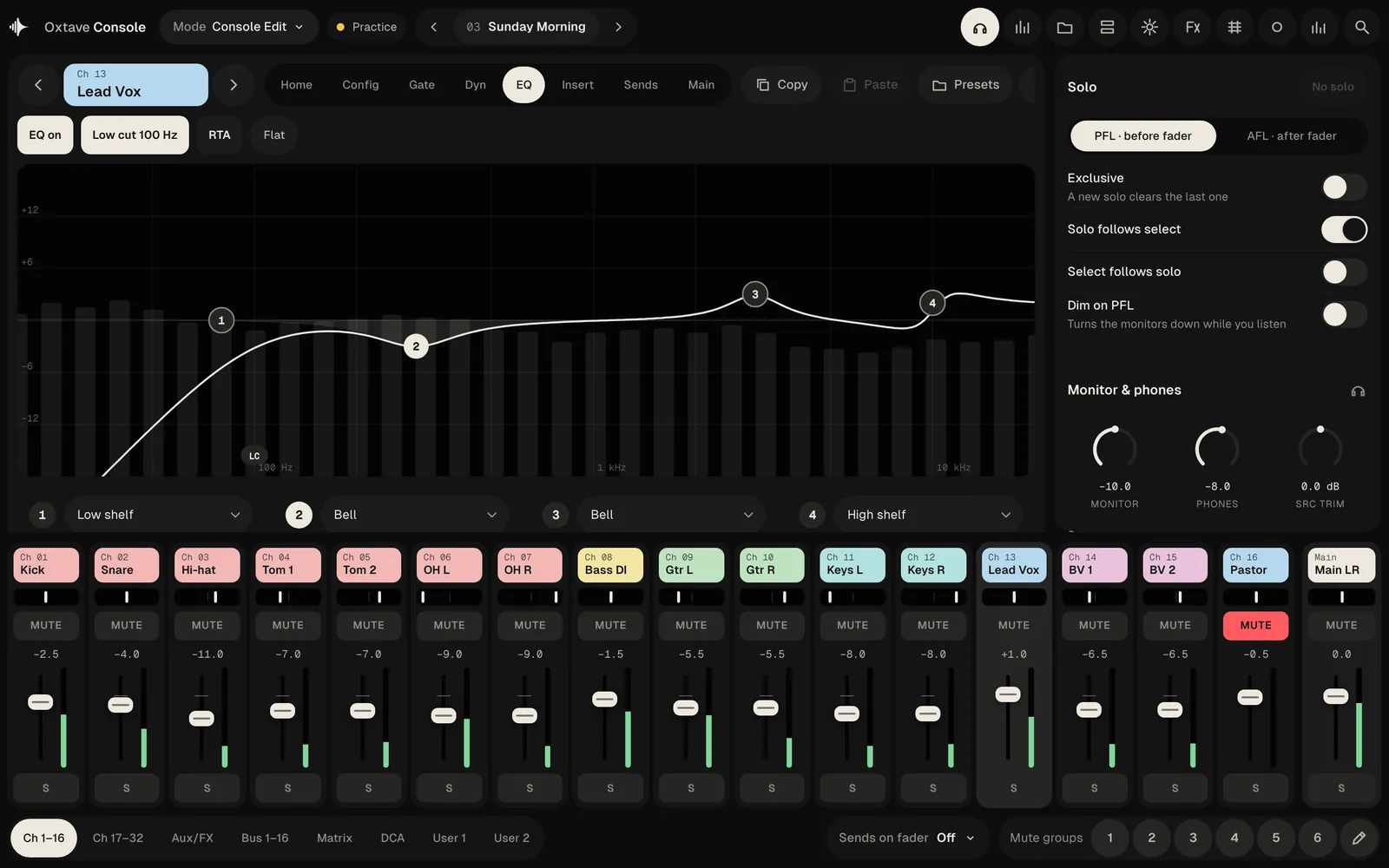
Console Edit

The whole desk on one screen.

Channel tabs for gain, gate, dynamics, EQ, inserts and sends above a full bank of faders, with solo and monitor controls at the side. Built for front of house with a laptop.

Mode Console Edit Practice03 Sunday Morning
Ch 13Lead VoxHomeConfigGateDynEQInsertSendsMain
1234LC
SoloPFL · before faderAFL · after faderExclusiveSolo follows selectDim on PFLMonitor & phonesMonitorPhonesSrc trim
Ch 01Kick
MUTES
Ch 02Snare
MUTES
Ch 03Hi-hat
MUTES
Ch 04Tom 1
MUTES
Ch 05Tom 2
MUTES
Ch 06OH L
MUTES
Ch 07OH R
MUTES
Ch 08Bass DI
MUTES
Ch 09Gtr L
MUTES
Ch 10Gtr R
MUTES
Ch 11Keys L
MUTES
Ch 12Keys R
MUTES
Ch 13Lead Vox
MUTES
Ch 14BV 1
MUTES
Ch 15BV 2
MUTES
Ch 16Host
MUTES
MainMain LR
MUTES
Ch 1–16Ch 17–32Aux/FXBus 1–16MatrixDCAUser 1
Touch Mix HomeDetailEffectsScenesMetersRouting
Sends on faderMute groups123456Lock mutes
Ch 01KickC
Mute
Ch 02SnareC
Mute
Ch 03Hi-hatR30
Mute
Ch 04Tom 1L30
Mute
Ch 05Tom 2R30
Mute
Ch 06OH LL80
Mute
Ch 07OH RR80
Mute
Ch 08Bass DIC
Mute
MainMain LRC
Mute
Ch 1–89–1617–24AuxFX retBus 1–8DCA
Mode Custom Layers Practice
Ch 13Lead Vox
MUTES
Ch 14BV 1
MUTES
Ch 15BV 2
MUTES
Ch 16Host
MUTES
Ch 08Bass DI
MUTES
Ch 09Gtr L
MUTES
Ch 10Gtr R
MUTES
Ch 11Keys L
MUTES
Ch 12Keys R
MUTES
LayersCh 1–1616 stripsVocals4 stripsBand10 stripsWedges9 stripsDCA8 stripsBuses16 strips+ Layer
My MixWedge SL · Bus 2
My volume
Groups move several channels together
Me1 channel
Band6 channels
Drums7 channels
Click1 channel
Channels 33
Lead VoxCh 13
KickCh 01
Bass DICh 08
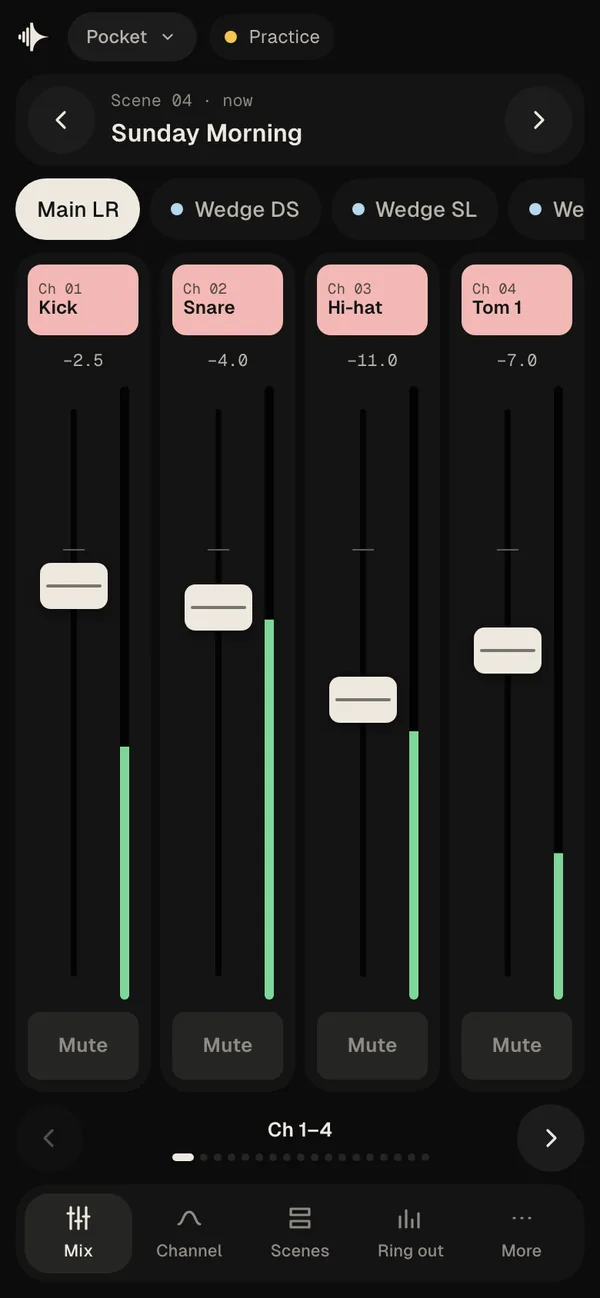
Pocket Practice
Scene 04 · nowSunday Morning
Main LRWedge DSWedge SL
Ch 01KickC
Mute
Ch 02SnareC
Mute
Ch 03Hi-hatR30
Mute
Ch 04Tom 1L30
Mute
Ch 1–4
MixChannelScenesRing outMore

For musicians

Every musician
mixes their own.

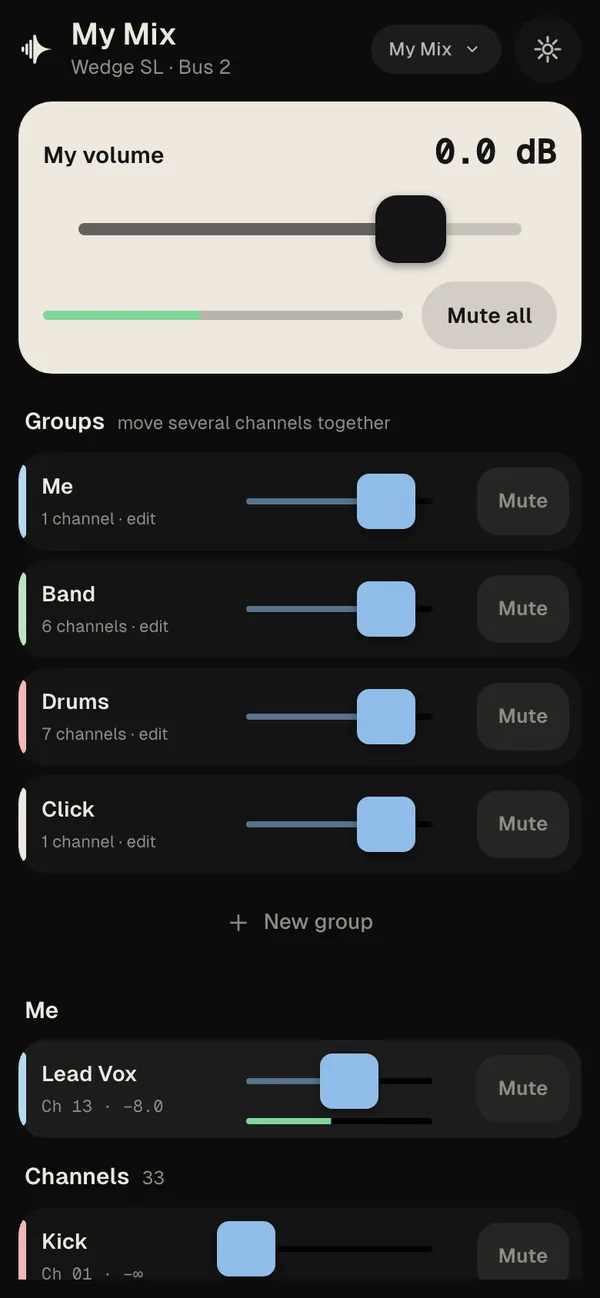
No more hand signals from the stage. Musicians mix their own wedge or in-ears in a phone browser, and they can only touch the mixes you allow.

  1. 01

    Switch it on

    In Setup → Web access, allow phones to join and tick the mixes they may change.

  2. 02

    Scan and pair

    Musicians scan the QR code on the same Wi-Fi and type the PIN. Nothing to install.

  3. 03

    Mix themselves

    Each one turns up what they need in their own wedge or in-ears. Nothing else on the desk moves.

The whole desk

Everything on the desk.
In your hand.

Ringing at 2.5 kHzCut −6 dB at 2.5 kHz

Ring out

Find the frequencies that feed back before the doors open, and cut them.

low cut
  • Lead Vox › EQ › Low cut 100 Hz
  • Kick › EQ › Low cut
  • Preferences › Low cut on new channels

Where is it?

Type what you're looking for and go straight to it.

01Doors02Walk-in03Sunday MorningRecalled04Sermon05Closing06Walk-out

Scenes and shows

Recall and step through scenes, and open or save the desk's own show files.

Meters

Every channel, bus and output, with an analyser for the main mix.

Channel editors

Gain, gate, dynamics, a four-band EQ with an analyser, inserts, sends and main, for every channel and bus.

Every effect

All of the desk's effect types with their own controls, in the eight effect slots.

Routing

Inputs, outputs and the card, patched from one screen.

Recorder

Start, stop and follow the desk's recorder from wherever you stand.

Monitor and solo

PFL or AFL, exclusive solo, dim, and the phones and monitor levels.

Mute groups and DCAs

Six mute groups, eight DCAs and sends on fader for any mix.

Desk words or plain words

Labels the way the desk says them, or in plain English for volunteers and new crew.

Finds the desk

Desks on the same network show up by themselves; or add one by its address.

A practice desk, built in

Learn the app or train new crew on a full demo show, without touching a real desk. Everything on this page is playing it.

Desks and devices

Desks
Behringer X32 and Midas M32
Connection
The same network as the desk; no internet needed
Laptops
Mac and Windows
Tablets and phones
iPad, iPhone and Android apps coming later
Musicians
Any phone browser, through the engineer's app
Status
Alpha; free to download

Questions

Good to know.

Which desks does Velton Console work with?

Behringer X32 and Midas M32 desks. More desk families will follow once these are proven at real gigs.

Do I need the Velton studio app?

No. Velton Console is its own app. It talks straight to the desk over your network.

Does it need the internet?

No. Your laptop, tablet or phone just needs to be on the same network as the desk.

Do musicians have to install anything?

No. The engineer switches on web access in their app, and musicians open My Mix in their phone's browser with a QR code and a PIN. They can change only the mixes the engineer allows.

Can I try it without a desk?

Yes. A practice desk is built in, with a full demo show, so you can learn the app or train new crew without touching a real one.

When can I get it, and what will it cost?

It's out now as an alpha for Mac and Windows, free while it's in alpha. Get it from the download page.